

Choosing the right ModulawAI plan is the first step to transforming how your legal practice operates. This guide explains every plan tier, how credits work, and what to expect from billing, so you can make an informed decision with confidence.
The Plan Tiers at a Glance
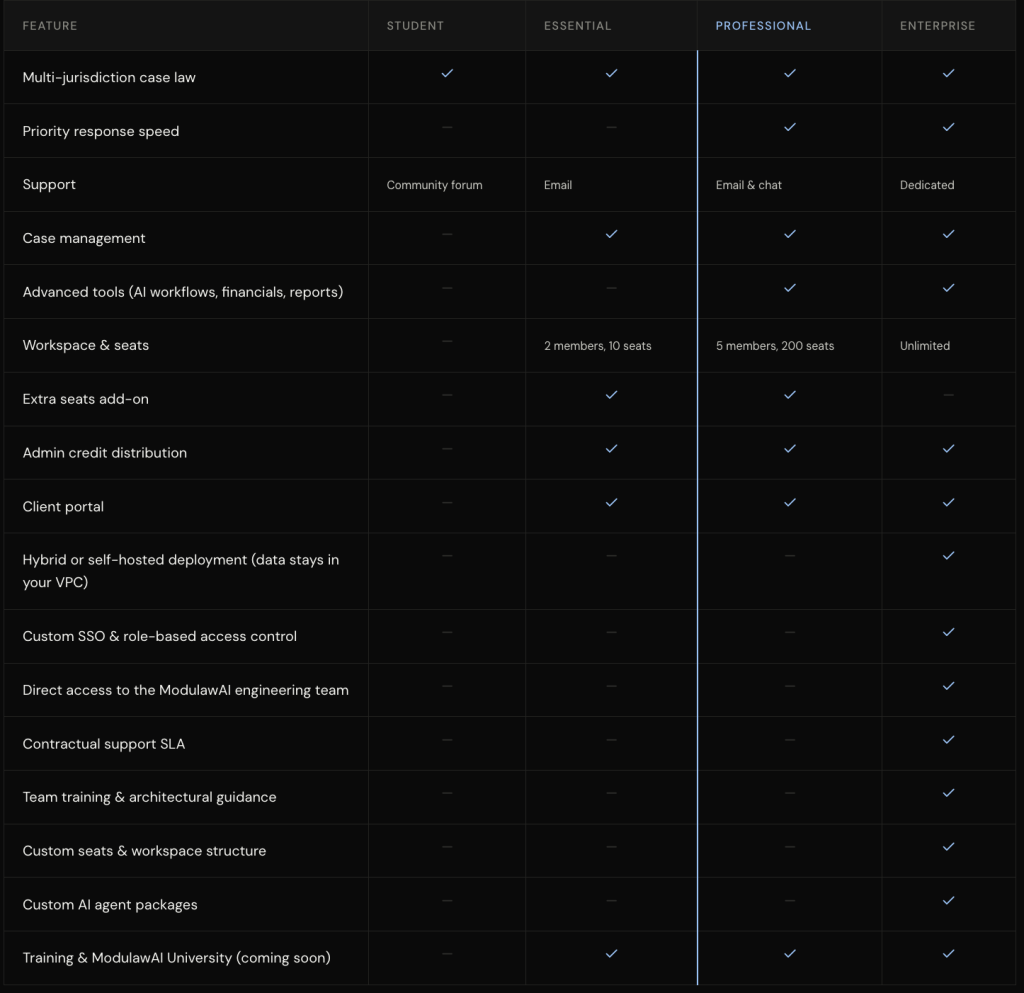
ModulawAI offers four plan tiers, each designed for a different stage of legal practice:
| Plan | Best For | Key Features |
|---|---|---|
| Student | Solo practitioners exploring AI | Access to core legal databases, Standard response speed, Email support |
| Essential | Small firms getting serious | Basic case law database access, Standard response speed Email support, 1 workspace with up to 2 members, Cases, Documents, Clients, Dashboard |
| Professional | Growing firms with teams | Full case law database access, Priority response speed, Advanced tools, Chat and email support, 1 workspace with up to 5 members, AI Workflows, Financials, Reports, Firm tools |
| Enterprise | Large firms & in-house teams | Everything in Professional + custom integrations, dedicated support, SSO, SLA guarantees |
Each tier unlocks progressively more powerful features.
For current prices and the credit allowance on each plan, see the pricing page — that is the single source of truth, and it always reflects what you will actually be charged.
How Credits Work
Credits are ModulawAI’s unit of compute, and your plan includes a monthly allocation. They are consumed per token — roughly, per word going in and coming back — so a long answer over a large document costs more than a short question. Which AI model you pick also affects the rate.

What consumes credits:
- Asking the legal assistant a question (varies by AI model, see the Models)
- Running a comprehensive research session
- Generating a legal draft or artifact
- AI Employees (SuperAgents) running on schedule
What does NOT consume credits:
- Case management operations (creating cases, tasks, events)
- Document storage and organisation
- Workspace administration
- Viewing your own data and dashboards
Your credit balance is a running total. Spending draws it down, and a renewal or a top-up adds to it — so a balance you have not spent is still there for you next cycle.
Billing Cycle
ModulawAI operates on a monthly billing cycle. Here is how it works:
- Sign-up date — Your billing cycle starts the day you subscribe to a paid plan.
- Monthly renewal — You are billed automatically on the same date each month.
- Credit top-up — Your credit allocation is added on your billing date, not on the calendar month.
Upgrading Your Plan
You can upgrade at any time. When you upgrade:
- The new plan takes effect immediately.
- You are charged the prorated difference for the remainder of your current billing cycle.
- Your credit allocation is topped up to the new plan’s level, proportionally to the days remaining.
Example: if you upgrade with 15 days left in a 30-day cycle, you pay roughly half the difference between the two plans for the remaining days, and receive a credit top-up in the same proportion.
Downgrading Your Plan
Downgrades take effect at the start of your next billing cycle, not immediately. This ensures you retain full access to your current plan’s features for the period you have already paid for.
When the new cycle begins:
- Your plan switches to the lower tier.
- Your credit allocation adjusts to the new plan’s level.
- Features exclusive to the higher tier become unavailable.
Invoices & Billing History
All invoices are accessible from your Billing page in Settings. Each invoice includes:
- Plan name and billing period
- Line items (plan fee, any add-ons)
- Payment method used
- Payment status (paid, pending, failed)
Invoices are generated at the start of each billing cycle. You can download them as PDFs for your records.
Payment Methods
ModulawAI accepts:
- Debit and credit cards (Visa, Mastercard, Verve)
- Bank transfers (for annual plans)
- USSD (select Nigerian banks)
Payment methods can be updated at any time from the Billing page. If a payment fails, you will receive an email notification and have a 7-day grace period to update your payment method before service is interrupted.
Annual Plans
All paid plans are available on an annual billing cycle at a 33% discount. Annual plans are billed upfront for the full year. Credits are allocated monthly, so you receive a fresh batch each month rather than all at once.