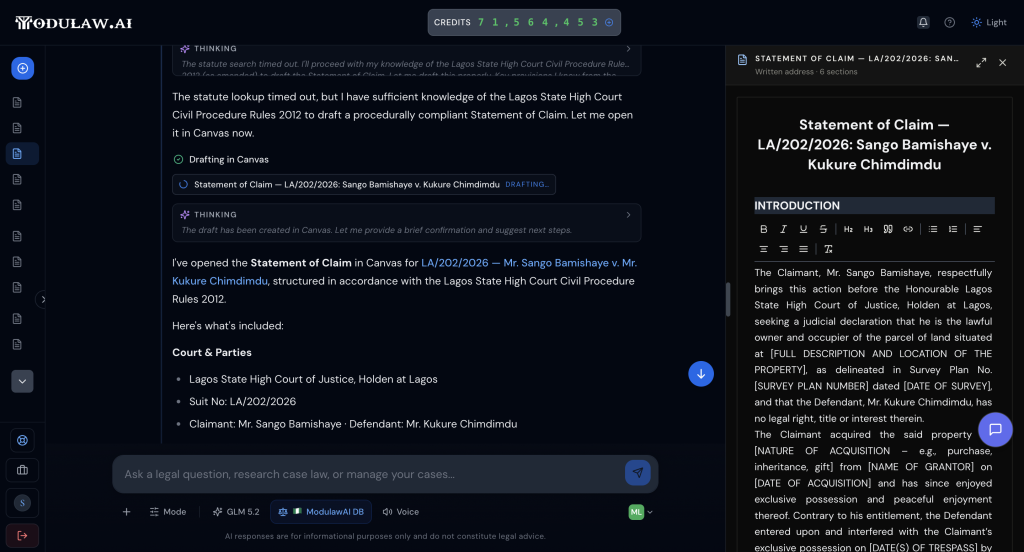
Artifacts are the long-form documents the assistant builds for you: written addresses, opinions, contracts, memos and more. Instead of scrolling past in the chat, an artifact opens in the Canvas, a side panel where you can read it properly, edit it, refine it with the assistant, and save it where you need it.
Artifact or chat reply?
| Chat reply | Artifact |
|---|---|
| A few paragraphs, inline in the conversation | A multi-section document, opened in the Canvas |
| Read it and move on | Edit it, refine it, then save or export it |
The assistant opens the Canvas when you ask for something substantial enough to warrant it. Short answers, quick summaries and casual emails stay inline.
What it can build
| Type | What it is |
|---|---|
| Written address | A formal court submission: introduction, facts, issues, arguments, conclusion |
| Legal opinion | A structured opinion on a point of law, with authorities |
| Brief | A concise legal argument with citations and statutory references |
| Contract | A full agreement: parties, recitals, operative clauses, execution block |
| Legal memo | An internal memorandum analysing a question |
| Formal letter | A demand letter, notice or formal correspondence |
| Report | Findings, analysis and recommendations |
Small apps, too
An artifact can also be a small working app, such as a fee calculator, an intake form or a simple dashboard. Apps run in a sealed sandbox inside the Canvas with no network access of their own. See App Builder for more.
Creating one
Just ask:
- “Draft a written address for the defendant in a breach of contract case.”
- “Write a legal opinion on whether the plaintiff has standing to sue.”
- “Prepare a demand letter to a tenant for three months of unpaid rent.”
The Canvas opens as the assistant writes. You can also reach it from a suggested action after a research session: the assistant will offer things like “Draft a written address” once it has found the authorities.
Working in the Canvas
Edit it directly
Click anywhere in the document and type. You can restructure sections, rewrite arguments and fix wording by hand. Use the expand control to give yourself the full width of the screen while you work.
Or ask for changes
With the artifact open, ask in plain English:
- “Expand the argument on Section 3 and add more case law.”
- “Shorten the introduction to one paragraph.”
- “Add a prayer for costs at the end.”
The parts you did not ask about are left alone.
Where artifacts are kept
Artifacts are stored in your account as soon as the assistant creates them, so closing the Canvas does not lose your draft. Every artifact you can open is listed on the Artifacts page, where you can open it again, go back to the conversation it came from, or make your own copy to change.
Version history
Choose Version history… from the Canvas menu to see earlier versions of an artifact. From there you can save the current state as a version before a big revision, and restore an older version if you want the earlier wording back. Saving and restoring versions depends on your plan.
Saving to a case and downloading
Choose Save to case… from the Canvas menu and pick one of three options:
| Save as | What happens | Requires |
|---|---|---|
| Note | The content is saved as a case note | Pick a workspace and a case |
| Task | The content becomes a task on a case | Pick a workspace and a case |
| Document | The document is exported and downloaded to your computer | Pick Word (.docx) or PDF |
Saving as a Note or a Task puts the artifact on a case. Saving as a Document downloads it to you.
Download formats
The Canvas menu also has direct downloads. Which ones you see depends on the artifact and your plan.
| Format | Best for |
|---|---|
| Microsoft Word (.docx) | Further editing, track-changes review, sharing with colleagues |
| PDF (.pdf) | Filing, sending to clients, printing |
| Markdown (.md) | Plain text you can paste into other tools |
| Web page (.html) | A copy that opens in any browser, including apps |
Getting better artifacts
- Be specific. “Draft a written address for the claimant in our distribution case, arguing the defendant breached Clause 7 of the Distribution Agreement” produces something far closer to usable than “draft a written address”.
- Research first, then draft. Ask for the authorities in the same conversation before asking for the document, and the draft comes back with real citations rather than placeholders.
- Iterate in small steps. One or two changes per turn lets you check each revision.
- Review before you rely on it. Artifacts are first drafts. Check every section and verify every citation before filing or sending.
- Save a version before a big rewrite. Then you can restore the earlier wording if you prefer it.