

The Modulaw API lets your own applications work with your workspace data — dashboards, internal tools, reporting, or anything else you want to build. You authenticate with an API key that you create yourself and scope to exactly what it needs.
Who can do this: Anyone on a paid plan. Free trials cannot use the API.
Before you start: Decide which workspace the key is for and which permissions it genuinely needs.
Looking for endpoints, request shapes and worked examples? Those are in the Modulaw API reference. This page covers getting set up.
Create a key
- Go to Profile → API access and click Create New API Key.
- Give it a name that says where it will run — “Compliance dashboard”, not “key 2”.
- Pick the workspace. Pinning to one workspace means a leaked key exposes only that workspace.
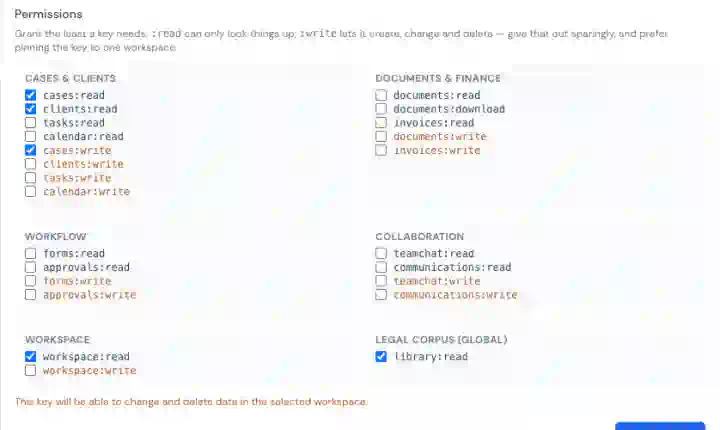
- Select the permissions. Grant the least the key needs — see Permissions for API keys and AI assistants.
- Copy the key. It is shown once and never again, because only a hash of it is stored.
If you lose a key, revoke it and create another. There is no way to recover the original.
Making a request
The base URL is https://backend.modulaw.ai. Send the key as a Bearer token:
curl https://backend.modulaw.ai/api/case-manager/workspaces/<workspaceId>/cases \
  -H "Authorization: Bearer mk_live_..."
Most endpoints are workspace-scoped and take the workspace id in the path. You can find yours in the URL when you are working in Modulaw, or by calling the workspaces endpoint with a key that has workspace:read.
Writing looks the same, with a JSON body:
curl -X POST https://backend.modulaw.ai/api/case-manager/workspaces/<workspaceId>/cases \
  -H "Authorization: Bearer mk_live_..." \
  -H "Content-Type: application/json" \
  -d '{"title":"Adebayo v. Lagos State","clientName":"Adebayo Ltd"}'
Send keys from your server, never from a browser or mobile app, where anyone can read them.
What a key can reach
Keys cover workspace data — cases, clients, tasks, calendar, documents, invoices, forms — and the global legal corpus. They are deliberately blocked from everything else: billing, credits, subscriptions, account settings, admin, and the AI assistant. A key also acts as you, so it can never do more than your own account can.
Two limits are worth designing around:
- The workspace pin is enforced on every request. A key pinned to one workspace is refused on any other, and the workspace in the URL is the one that counts.
- Keys cannot manage keys. The API-access endpoints are reachable only from a signed-in session, so a key can neither create nor revoke keys — including itself.
Rate limits
Each key is limited to 120 requests per minute. Over that you get 429 Too Many Requests; wait for the window to reset and retry. Build in a backoff rather than hammering the endpoint.
Reading errors
401— the key is missing, revoked, or expired. Check theAuthorizationheader.402— the subscription behind the key is not active. The API needs a paid plan; trials do not qualify.403— the key lacks the permission for that call, is pinned to a different workspace, or the route is outside what keys may reach. The message says which.429— rate limited.
The full list, with what to do about each, is in the API reference.
Revoking a key
Go to Profile → API access, find the key and click Revoke. It stops working immediately. The list also shows when each key was last used and how many calls it has made, which is the quickest way to spot one you no longer need.
Good to know
- Use one key per application, not one shared everywhere. Revoking then affects only the thing you meant.
- If you want an AI assistant rather than your own code, use MCP instead — no key needed.
- Keys do not expire on their own, so review them periodically and revoke what you are not using.