API keys and AI assistants both work on permissions: narrow grants like cases:read that say exactly what a credential may touch. This page lists them all so you can grant the least you need.
Who can do this: Anyone on a paid plan.
Before you start: Read Using the Modulaw API or Connect an AI assistant first. This page is the reference behind both.
How permissions are named
Each one is area:action. The action is either read (look things up) or write (create and change). documents:download is separate from documents:read because listing a document is not the same as pulling its contents.
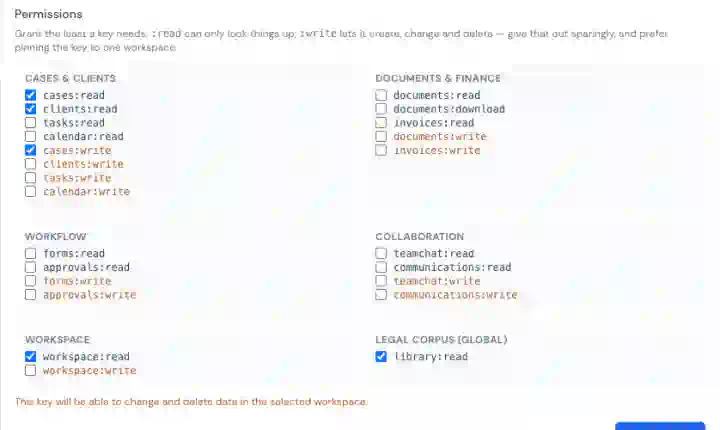
The full list
| Area | Covers | Read | Write |
|---|---|---|---|
| Cases | Matters, timelines, notes, financial summaries | cases:read | cases:write |
| Clients | Client records, contact details, client notes | clients:read | clients:write |
| Tasks | Tasks and deadlines on a matter | tasks:read | tasks:write |
| Calendar | Events and hearings | calendar:read | calendar:write |
| Documents | Document records and metadata | documents:read | documents:write |
| Documents (file) | Downloading the actual file contents | documents:download | None |
| Invoices & time | Invoices, expenses, time entries, templates | invoices:read | invoices:write |
| Forms & processes | Templates, assignments, submissions, process runs | forms:read | forms:write |
| Approvals | Approval requests and decisions | approvals:read | approvals:write |
| TeamChat | Channels and messages | teamchat:read | teamchat:write |
| Communications | Email and messaging records | communications:read | communications:write |
| Workspace | Workspace details, members, and custom field definitions | workspace:read | workspace:write |
| Legal corpus | The shared case-law and legislation library | library:read | , (read-only by nature) |
That is 13 read permissions and 11 write permissions. The corpus is shared reference data, so there is no library:write.
What AI assistants can be granted
Assistants connecting over MCP are offered a subset: everything above except Approvals, TeamChat and Communications. Those permissions exist and can be granted to an API key, but no assistant tools cover them yet. So they are deliberately not offered on the consent screen rather than being requested and doing nothing.
Read versus write
A read-only credential can look things up and summarise, and cannot change anything. That is the right default for reporting, dashboards and research.
Write permissions let a credential create and change data. Grant them deliberately, and prefer pinning to a single workspace when you do. In the key form, write permissions are highlighted and selecting one tells you what it will allow.
Deleting is handled separately
For AI assistants, a destructive action is not something a write permission silently allows. The first attempt is refused and returns a plain-English description of what would be removed. “this will delete this task; this cannot be undone”. The assistant must show you that and repeat the request before anything happens.
The point is not to stop a determined client. Anything holding a valid credential can make two calls instead of one. It is to stop a model deleting something as a confident side-effect of a vaguely worded request, with nobody having agreed to it.
Deleting many records at once is confirmed the same way, once for the whole batch rather than once per record. And the confirmation is tied to the exact list. If the assistant changes what it is deleting after you agree, the confirmation no longer applies and it must ask again.
Two limits apply to everyone, your own API keys included. Bulk deletes are capped at 200 records per request. And a client that still has cases attached cannot be deleted at all: a case cannot exist without a client, so the request is refused and tells you which cases are in the way. Archive the client instead if you simply want it out of your working list; the record and its history stay intact.
What no permission grants
Some things are outside this system entirely. No permission gives an API key or an assistant access to:
- Billing, credits or subscriptions
- Account settings or your password
- Admin functions
- The AI assistant itself
- Creating or revoking API keys, including its own
Good to know
- Permissions bound a credential; they do not extend you. A credential acts as you, so your own role and workspace membership still apply on top.
- The workspace pin is the strongest control you have. A pinned credential is refused on every other workspace, whatever permissions it holds.
- If a call is refused, the error names the missing permission, so you can grant exactly that one rather than widening the credential.
- Which permission a given endpoint needs is listed in the API reference.