Microsoft Word add-in for lawyers
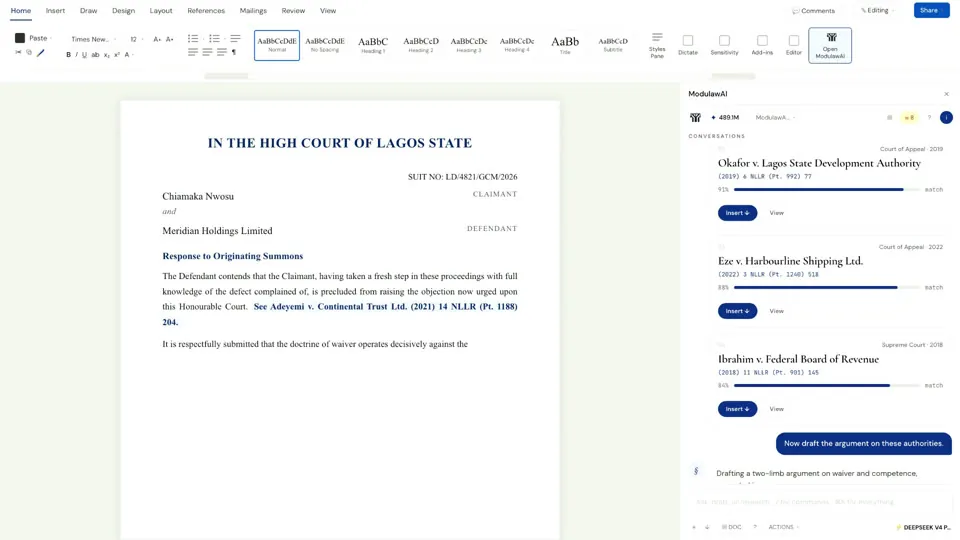
ModulawAI inside the document.
Draft, redline, cite, and research without leaving Microsoft Word. Every change tied back to the matter and the audit trail.
0
App-switching required
Live
Sync with the matter
Word
Native on macOS and Windows
Cite
Authority drop-in
Capabilities
What’s inside.
Drafting assist
Generate clauses, sections, and full first drafts against the matter context, inside Word, in the firm's style.
Redline suggestions
Track-changes-style suggestions surfaced inline, accept or reject one at a time or in batches.
Citation drop-in
Search authorities in the side panel and insert them at the cursor with jurisdiction-correct formatting.
Matter context
The add-in knows which matter you're drafting against and reads its facts, parties, and prior documents.
Tone and clause modes
Switch between strict, persuasive, and conservative tones. Switch between drafting and review modes.
Jurisdiction-aware
The add-in respects your jurisdiction for citation format, statutory references, and stylistic conventions.
Audit logged
Every AI action inside the document is logged against the matter: what was suggested, what was accepted.
Office 365 and desktop
Works in Word on macOS, Windows, and Word for the web. Single sign-on with your ModulawAI workspace.
In depth
A closer look.
Workflow
Drafting at the speed of thought.
Open Word. Open a matter's draft. The side panel knows the matter, knows the parties, knows the prior filings. Ask it to draft a section. Review the suggestion. Insert. Cite. Move on.
- Inline suggestions you can accept, reject, or refine
- Side-panel research that pastes citations at the cursor
- No copy-paste between Word and a separate chat tool
Compliance
Every change, accountable.
Every AI-generated suggestion is attributed. Every accepted change is logged against the matter. Every cited authority is recorded. The audit trail your firm needs lives alongside the document, not separately.
Research inside the document
Why legal research belongs inside Microsoft Word.
Lawyers spend the majority of their working hours in Microsoft Word. Briefs, contracts, opinions, memoranda, letters and court processes are drafted there, partners review in track changes, and clients expect Word files. Yet research has usually happened somewhere else, with Word treated as the place results get pasted. Every citation becomes a context switch: leave the document, search, copy, switch back, paste, format. The add-in makes Word the research environment instead.
Verified as inserted
Every citation checked against its source.
Every citation the AI inserts is verified against its source database before it appears in your document. Nigerian cases are checked against the internal judgment database, US cases against CourtListener, UK cases against BAILII, Canadian cases against CanLII, EU cases against EUR-Lex, Ghanaian cases against GHALII, Kenyan cases against Kenya Law, and South African cases against SAFLII. Citations are formatted for the jurisdiction: NWLR, All FWLR or LPELR for Nigeria, Bluebook for the US, OSCOLA for the UK.
If a citation cannot be verified, it is flagged with a comment, never silently inserted as if it were confirmed. That closes off the most dangerous failure mode of AI in legal practice: fabricated citations. See legal research software for the sources behind it.
Before you finalise
Contradiction analysis on every cited authority.
Before a document goes out, the add-in can check every cited authority against the legal knowledge graph that tracks citation relationships across the eight jurisdictions, and identify whether any case has been:
- Distinguished: a later court found the case’s ratio does not apply to the facts at hand
- Overruled: a higher court explicitly overturned the decision
- Criticised: academic or judicial commentary has questioned the reasoning
- Conflicted: a higher court decision reaches a contrary conclusion on the same point
The drafting workflow
What changes when research moves into Word.
Without the add-in
- Open Word and start drafting
- Need an authority: open a research database in a browser
- Search for the case, find it, copy the citation
- Switch back to Word, paste the citation, format it manually
- Continue drafting, need another authority, repeat
- Finish the draft, manually verify each citation is still good law
- Send to the partner, who marks up with track changes
- Address the comments, re-verify citations, finalise
With the add-in
- Open Word; the sidebar is already there
- Start drafting; the AI can generate sections from your brief
- Need an authority: search in the sidebar and insert it with one click, formatted and verified
- Keep drafting while comments flag missing authorities and potential risks
- Finish the draft and run contradiction analysis on all citations
- Send to the partner, with AI suggestions already in track changes
- Address the comments and finalise
The difference is not just speed. It is the end of context switching: every step that previously required leaving Word now happens inside it, and the lawyer’s attention stays on the document.
In practice
What happens when you ask it to redline a clause.
The point of an add-in is that nothing leaves the document. Suggestions arrive as edits you already know how to handle, rather than as text in a chat window that you then have to retype.
| Step | What you see in Word |
|---|---|
| You select the clause | The add-in reads the selection and the surrounding context, not just the sentence |
| It checks the matter | The clause is read against the file it belongs to, so the advice is not generic |
| It proposes changes | Native track changes. Accept, reject and review exactly as you would a colleague’s markup |
| It explains itself | Findings arrive as Word comments anchored to the paragraph they concern, with the reasoning attached |
| It cites | Authority behind a position is linked, jurisdiction-aware, and checked as you draft |
| It records | The work is tied back to the matter and the audit trail, and the time is captured |
Word desktop on macOS and Windows, plus Word for the web, with the same feature set. The AI features need a connection; ordinary offline drafting in Word is unaffected.
Who it is for
Four kinds of lawyer, one sidebar.
Litigators
A written address or brief of argument needs more authorities than any other document. Searching, inserting and verifying without leaving Word turns a multi-tool process into one continuous draft.
Corporate lawyers
Draft standard clauses, flag missing provisions, and surface risks as inline comments. For due diligence, tabular review compares the same fields across a batch of contracts.
In-house teams
Policies, compliance documents and advisory memos generated from briefs, reviewed by the legal team in Word, and finalised with consistent formatting and citation standards.
Cross-border practices
A contract under Nigerian law in the morning and an opinion under English law in the afternoon, without learning a second citation format or switching research tools.
FAQ
Questions, addressed.
How do I install it?
Install ModulawAI for Word from the Microsoft AppSource listing at marketplace.microsoft.com/en-us/product/saas/wa200010779, then sign in with your workspace credentials. Most firms are running it in under five minutes.
Does it work on Word for the web?
Yes. Word desktop on macOS and Windows, plus Word for the web. Same feature set.
Is my document content sent to AI providers?
Only the content needed to answer your prompt, and only routed through providers your firm has approved. Nothing trains a model. Nothing leaks across firms.
Can I use it offline?
The add-in needs a connection to query the model and the matter context. Word's offline drafting works as it always has. The AI features just wait for connectivity.
How is this different from Copilot for Microsoft 365?
Microsoft Copilot is a general-purpose assistant. It helps with writing, summarising and formatting, but it does not search legal case law databases, verify citations against their sources, run contradiction analysis, or know jurisdiction-specific citation formats and court rules. The ModulawAI add-in is a legal research and drafting tool that happens to live inside Word.
Can multiple lawyers collaborate on the same document?
Yes. Because AI suggestions arrive as native track changes, they are visible to every reviewer who opens the document. Partners accept or reject them exactly as they would a colleague’s markup, and the review cycle works the way it always has in Word.
Keep reading
Related reading.
See it against your matters.
Get started in minutes, or book a demo and we’ll run it on your firm’s real work.