AI legal assistant
The AI legal assistant for drafting, research and analysis.
An AI legal assistant that reads primary law, not a summary of it. Ask a question and get cite-checked authorities, statute cross-references and risk flags in minutes, then carry the answer into a draft with the citations intact. Built for the jurisdiction you actually practise in.
95%
Research accuracy
80%
Faster than manual
4–8h
Returned per matter
8
Jurisdictions: NG · US · UK · Canada · EU · Ghana · Kenya · SA
Capabilities
What’s inside.
Case-law search
Natural-language search across Nigeria, the US, the UK, Canada, the EU and pan-African sources, cite-checked at the source.
Statute cross-reference
See how statutes have been interpreted across cases, with the authoritative chain of precedent.
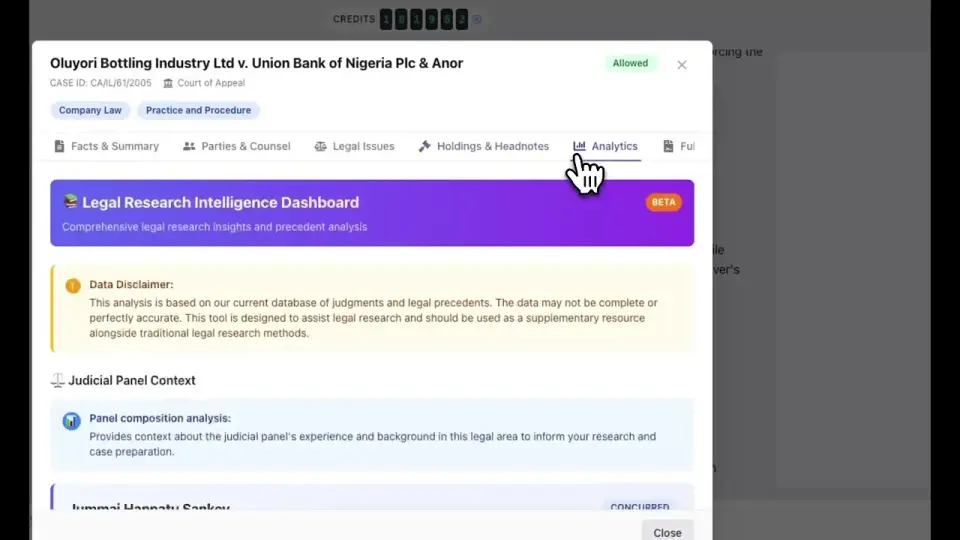
Judicial pattern review
Track how specific judges have ruled on similar cases and surface the patterns that matter.
Risk flagging
Adverse authorities, distinguishable rulings, and procedural traps surfaced as you draft.
Document analysis
Upload PDF, DOC, or DOCX. The AI extracts issues, citations, and statutory cross-references in seconds.
Citation lineage
Every authority comes with its full chain: source, status, subsequent treatment, and conflicting holdings.
Jurisdictional context
Results scoped to your jurisdiction first, with comparative authorities surfaced where useful.
Continuously updated
Court decisions, legislation changes, and legal commentaries indexed continuously, not on a release cycle.
In depth
A closer look.
Workflow
Research that reads like a second chair.
Ask the question in plain English. Get an answer with cited authorities, the chain of precedent, and the open issues. Drop the result into a draft with citations preserved.
- Plain-English prompts; no Boolean operators required
- Inline citation insertion, formatted to your jurisdiction
- One-click drop into a Word draft or matter note
Accuracy
Cite-checked at the source.
Every authority is checked against its current status (overturned, distinguished, narrowed, or unaffected) when you cite it. No more discovering on the day of hearing that your lead authority has been overruled.
Method
How the assistant answers a question.
The assistant does not answer from memory. It finds the law first and then writes from what it found, which is the difference between a citation you can open and a citation that merely looks plausible. Five steps sit behind every response.
- The jurisdiction is fixed before anything is read. A question is bound to a forum at the start, so a Nigerian matter is answered on Nigerian authority rather than on whatever the model happens to remember.
- Primary sources are retrieved first. Judgments, statutes and rules of court are pulled from the indexed corpus before a single line of the answer is composed.
- The answer is written from the retrieved text. Each proposition is tied to the document it came from, so the reasoning can be traced back rather than taken on trust.
- Every authority is linked. If a source cannot be linked, it is not asserted. That single rule is what stops the fabricated-citation problem that has put lawyers in front of judges.
- Status is checked before you rely on it. Subsequent treatment is surfaced with the authority, so an overruled case is labelled as one.
Anatomy
What comes back.
An answer arrives in the same five parts every time, so you can check it the way you would check a junior’s note: quickly, and in the order that matters.
| Part | What it contains | What to check |
|---|---|---|
| The proposition | A direct answer to the question you asked, in plain terms | That it answers the question you actually asked |
| The authority | The statute, section or judgment the proposition rests on, as an openable link | Open it. Confirm it says what the answer claims |
| The treatment | Whether the authority has been followed, distinguished, narrowed or overruled | That nothing has displaced it since |
| The gap | The parts of the question the sources do not settle | Whether the gap is one you can argue around |
| The draft | Usable paragraphs carrying the citations, ready for Word | Tone, forum conventions and your own judgement |
Surfaces
Where you can use it.
The assistant is the same across every surface, and so is the matter context behind it. Research started in the browser is available in the document, and work done in Word is recorded against the file.
- In the browser. The full assistant, with documents, matters and history alongside it.
- Inside Microsoft Word. Native track-changes redlines and comments anchored to the paragraph, through the Word add-in.
- On the desktop. A desktop app for Mac that keeps working when the connection does not. A Windows version is in progress.
- By voice. Ask a question and hear the answer, for the walk between chambers and court.
- In team chat. Summon the assistant into a channel so the answer lands where the team is already talking.
- Through the API and MCP server. Reach it from your own systems, or from another AI client that speaks MCP.
Who reaches for it most.
| Practice | What they use it for |
|---|---|
| Advocates and litigators | Finding the authority on a point, checking it still stands, and turning it into a written address |
| Corporate and transactional | Reading the clause against the statute behind it, and reviewing across a set of agreements |
| In-house teams | Answering the business quickly without opening a panel firm instruction |
| Solo practitioners | The second pair of eyes a solo practice does not otherwise have |
Limits
Where it stops.
A tool that claims no limits is describing a demo rather than a product. These are ours, stated plainly.
- It is not legal advice. Everything it produces is a starting point for a qualified lawyer, and the professional responsibility for the filing stays with you.
- Linking is not reading. The assistant will not assert an authority it cannot link, but a link is only a promise that the document exists. Read the judgment before you rely on it.
- Coverage is uneven. Some jurisdictions are indexed far more deeply than others, and a source that blocks automated access is a source we cannot reach. Depth in Nigeria is not the same as depth in every jurisdiction listed.
- It only knows what it is given. Documents that live in a drawer, a personal inbox or a system it is not connected to are invisible to it.
FAQ
Questions, addressed.
What is an AI legal assistant?
An AI legal assistant is software that takes on the reading, drafting and analysis a junior lawyer would otherwise do: finding the authorities on a point, checking they are still good law, summarising a bundle, drafting a first version of a clause or a letter, and flagging risk. ModulawAI’s assistant does this against primary sources with linked citations, inside the matter and inside Microsoft Word, so the output lands where the work is rather than in a separate chat window.
How is it different from ChatGPT for legal work?
A general chatbot answers from memory and cannot show you where a proposition came from. ModulawAI retrieves the statute or judgment first, answers from it, and links every citation so you can verify it in seconds. It also knows which matter you are in, captures the time, and drafts in your document rather than a transcript.
Does it invent citations?
It is built specifically not to. The assistant answers only from documents it has retrieved, and an authority that cannot be linked to its source is not asserted. That is the guard against the fabricated-citation problem that has led to sanctions in several courts. It is a guard, not a guarantee of correctness, so the link is there for you to open and check.
Which jurisdictions are covered?
Coverage of Nigeria, the United States (CourtListener), the United Kingdom and Ireland (BAILII), Canada (CanLII), the EU (EUR-Lex), and pan-African sources (Ghana/GHALII, Kenya Law, South Africa/SAFLII), with active expansion to additional jurisdictions. Depth varies between them, and comparative authorities surface across borders where useful.
How accurate is the analysis?
Over 95% accuracy on case-law analysis, validated by practising lawyers. The database is continuously updated with new court decisions and commentaries.
Can I upload my own documents?
Yes. Upload PDF, DOC, or DOCX and the AI extracts key issues, pulls relevant citations, cross-references applicable statutes, and flags potential risks.
Does it work offline?
Partly. The desktop app for Mac keeps your matters and documents available offline and syncs when the connection returns, with a Windows version in progress. Research that needs to retrieve fresh authority needs a connection, because the point of the assistant is to read the source rather than recall it.
What does it cost?
Plans are published rather than quote-only, and are billed in your local currency. Every plan includes the assistant, with a monthly pool of AI credits shared across research, drafting, document reading and voice. See pricing for current figures.
Is my research kept confidential?
Yes. Your queries and documents are never used to train AI models and never shared with third parties.
Keep reading
Related reading.
See it against your matters.
Get started in minutes, or book a demo and we’ll run it on your firm’s real work.