Contracts
Contracts that live where they are drafted. Approved, signed and tracked from the same page.
ModulawAI’s contract lifecycle management runs inside the draft editor your lawyers already write in. A contract strip at the top of the document shows its number, its stage and the one thing to do next. Parties, dates and value are entered once. Approval is of the exact words, signing happens on those words, and the register tells you which agreements are expiring before anyone has to remember.
18
Agreement and deed templates to start from, plus your own
10
Signers on one contract
30 days
Default warning before a contract expires
1
Primary action on the strip at each stage
The lifecycle
One strip, one next step, at every stage.
Open a contract and a slim strip sits above the text: the number, a status chip and one primary button for the stage it is in. Forms open as a panel under the strip. The strip only asks; every rule behind it is enforced by the server.
Draft
Write and negotiate with suggestions, comments and version history. The action is Send for approval. Open suggested changes must be accepted or rejected first, so the approver reads the final words.
Waiting for approval
The approver approves or rejects in the editor, signing if the contract asks for it. A rejection, or the owner reopening it, sends it back to draft.
Approved
The strip shows who approved it and warns if the wording has changed since. Send for signature works only while it reads exactly as approved.
Out for signature
See who has signed, send reminders, copy a signer’s link or withdraw. If the words change, the old version cannot be signed and a revised version goes out.
Signed
The document is read-only for everyone, with a Signed copy button for the sealed PDF. Expiry and renewal notices start here.
Declined, voided or amended
A declined contract can go back to draft. A voided one is kept, with its reason, and never revived. A signed contract superseded by a signed amendment reads Replaced by an amendment.
Drafting
Start from a template, a blank page or a document you already have.
A contract is a record attached to a document in the draft editor. The words stay in the document; the record holds everything about the deal that is not the words.
Three ways in
New contract, or Make contract.
From the Contracts register, New contract asks for a title, a type and what to start from: a blank document or one of the firm’s agreement and deed templates. It opens straight in the editor. To turn a document you already have into a contract, open it and choose Make contract in the editor header.
The built-in set has 18 jurisdiction-neutral agreement and deed templates, from mutual and one-way NDAs, services, SaaS, lease and employment agreements to share purchase, shareholders, loan, guarantee and settlement agreements, a power of attorney and a deed of assignment. Governing law is left as a field, not assumed. Your firm’s own Word templates sit alongside them, and each contract is numbered from your workspace’s contract numbering, for example CON/2026/009.
Fields
Enter the terms once.
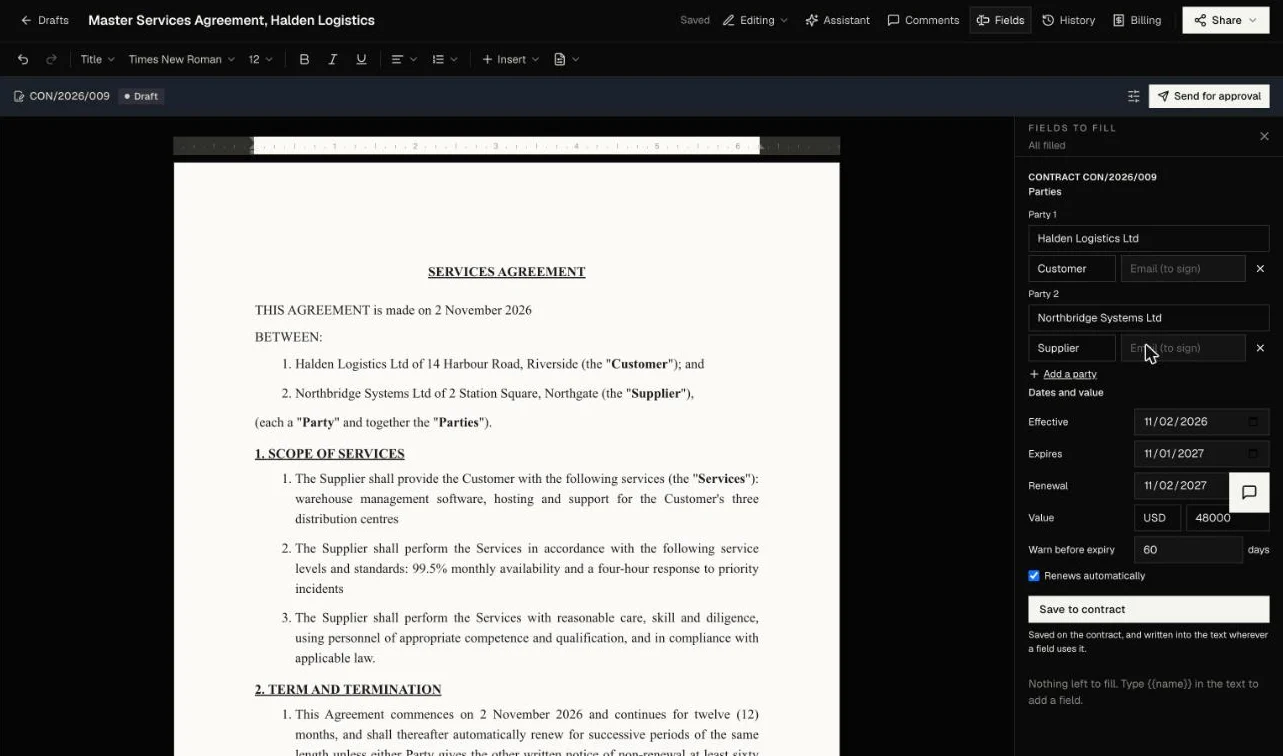
The Fields panel opens with a contract block at the top. Whatever you save there is saved on the contract and written into the text wherever the document uses that field, so the agreement, the register and the expiry notices all read the same values.
- Parties: a name and role for each, and an email for anyone who will sign
- Dates: effective, expires and renewal
- Value: an amount with its currency code, such as USD 48,000
- Warn before expiry: the notice period in days
- Renews automatically: a tick, which changes what the expiry notice says
- Template blanks for parties, dates and value filled from the same panel
Parties, value and dates are terms of the deal, so they can be edited only in a draft. Later, the owner reopens the contract first, which withdraws any approval or signing request resting on the old values.
Review
Check the draft against your own positions before anyone approves it.
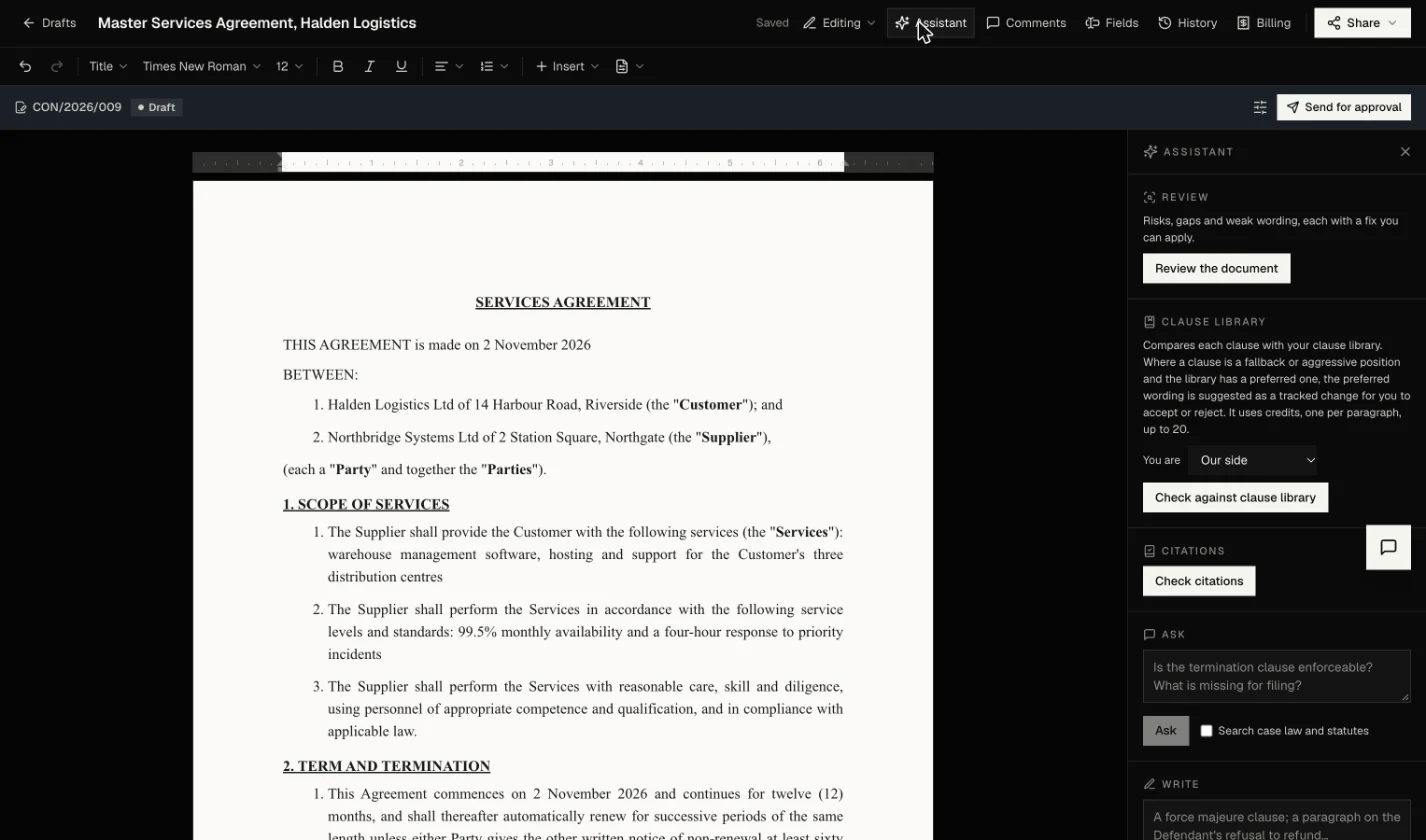
The Assistant panel sits beside every draft in the editor. On a contract it is where the first pass of review happens, and every change it proposes arrives as a tracked suggestion you accept or reject.
Review
Risks, gaps and weak wording.
Review the document lists risks, gaps and weak wording, each with a fix you can apply as a suggested change. Check citations flags authorities that cannot be found, Ask answers questions about the draft, and Write drafts a new clause in the document’s own style.
Clause library
Your preferred wording, as a tracked change.
Your firm keeps its clauses under Firm tools, each with a position: preferred, fallback or aggressive, and the side it favours. Check against clause library reads the draft paragraph by paragraph and asks which library clause each one most resembles.
- Matches a preferred clause: it is in line and left alone
- Matches a fallback or aggressive clause, and the library has a preferred one: the preferred wording is suggested as a tracked change
- No preferred clause to offer: it is noted, nothing changes
- Low confidence or no match: it says so, nothing changes
- You are sets whether you act for our side or the counterparty, which decides the preferred clause offered
It checks up to 20 paragraphs a run, skips very short ones, and uses credits for each paragraph it checks. It never edits the wording itself.
Approval
Approval of these exact words.
Sending for approval records the editor version and a fingerprint of the wording the approver sees. Approval is of those words only.
Sending for approval
Say whether the approver signs.
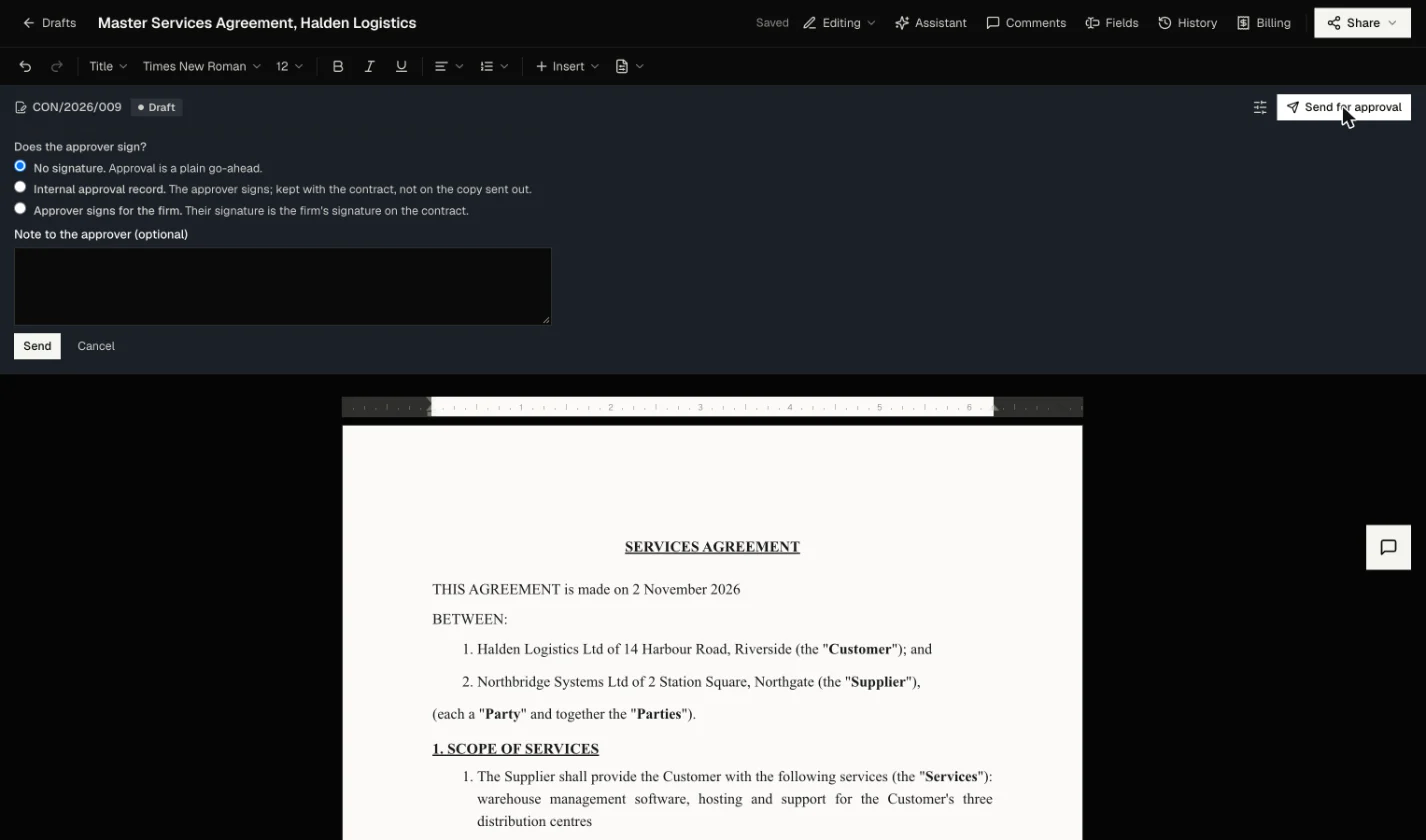
Send for approval opens a short panel with three choices and a note to the approver:
- No signature: approval is a plain go-ahead
- Internal approval record: the approver signs, and the signature is kept with the contract, not on the copy sent out
- Approver signs for the firm: their signature is the firm’s signature on the contract, and they appear as a signer who has already signed
Approvers who could not yet open the document are given review access and a link into the editor. An ethical wall still applies.
The wording lock
Change a word and it goes back for approval.
The fingerprint is a hash of the document’s plain text with whitespace normalised. Any word, number, name, date or punctuation mark added, changed or removed changes it. Fonts, spacing and letterhead do not.
Once approved, the strip warns if the text no longer matches, and the server refuses to send it for signature until it does. Reopening clears the approval and any approver signatures, because they were given on the earlier wording.
Approval policies
Route larger contracts to more senior approvers.
Contracts are an approval type in your workspace approval policy. Approval is opt-in: until the firm names an approver, sending a contract for approval approves it straight away and records that none was required. Because contracts carry a value, a larger one can go to a more senior approver. Approval routing is part of the Professional plan.
Signing
Signed on the wording that was approved.
An approved contract is sent for signature from the strip, with the same signing tools as any document, plus the contract rules.
Sending
Who signs, in what order, and how they prove it.
- Signers start from the contract’s parties and any signature fields in the text
- Up to 10 signers, all at once or in a set order
- Links last 14 days by default and up to 90, with automatic reminders three days after the last email, at most twice
- An optional identity check: a 6-digit code emailed to the signer, or a code you give them yourself by phone or in person
- A firm member who is a signer can sign straight away with Sign now
While it is out
Nobody signs a version that has changed.
Each signing request is bound to one reading of the document. The document is not locked while it is out, by design: if someone edits it, nobody can sign the old version. The owner sends a revised version, which is approved again, and everyone signs again, including anyone who already had.
Withdrawing with the wording unchanged returns the contract to approved. Expired requests are closed automatically, so a contract does not sit at out for signature forever.
The signed copy
Sealed, fingerprinted and filed.
When the last signer signs, the signed copy is rendered from the exact saved version they were sent, with a signature page and a certificate listing each signer, time, IP address, device and method. It is sealed, fingerprinted with SHA-256 and stored, and filed in the case’s documents when the contract is on a case.
Whether a particular agreement may be signed electronically depends on the law that governs it.
The register
Every agreement the firm has, and where each one stands.
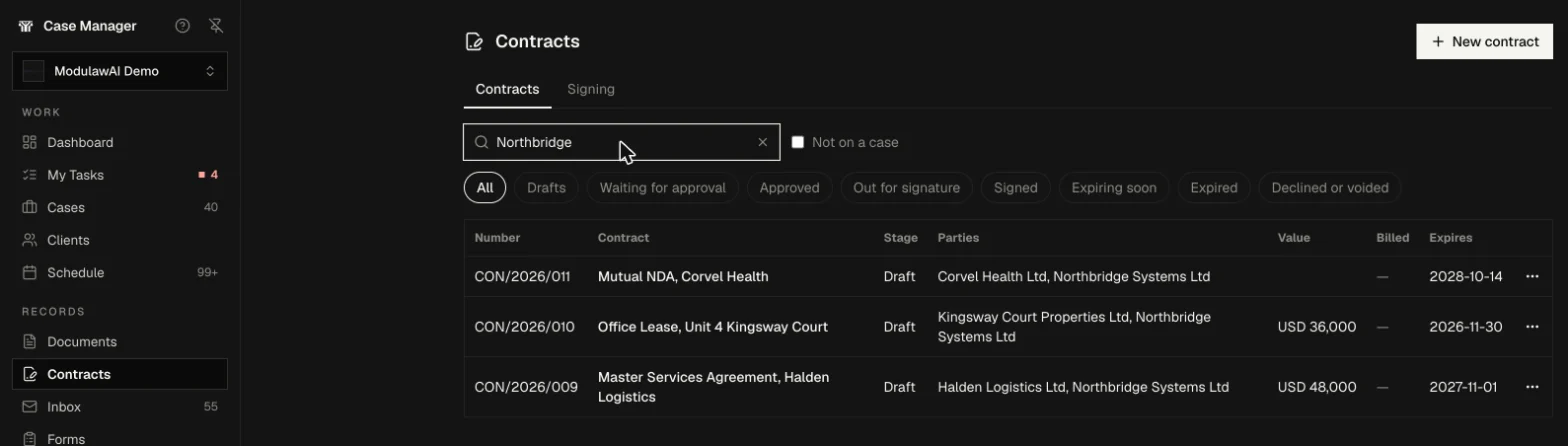
In Case Manager under Records, the register lists every contract you may see: number, title, stage, parties, value, billed and expiry.
Find it
Filter by stage, search by party.
- Filters: All, Drafts, Waiting for approval, Approved, Out for signature, Signed, Expiring soon, Expired, and Declined or voided
- Search by title, number or party
- Not on a case shows contracts held at firm level
- Each row’s menu opens the contract, its billing, or a time entry against it
Expiring soon means a signed contract inside its notice period, or inside 30 days of expiry when none is set. It is read off the dates each time, never stored, so a missed run cannot leave a contract wrongly active.
Key-date notices
Told once, by email, in time to act.
Every morning at 07:00 UTC, ModulawAI checks signed contracts and emails each contract’s owner, once for each event:
- Nearing its end: the expiry is inside the notice period, or 30 days when none is set. The email says whether it renews automatically unless notice is given, or ends unless it is renewed
- Expired: the expiry date has passed
- Due for renewal: the renewal date is inside the same window
Each email links to the contract; a failed send is retried the next morning. The Signing tab beside Contracts lists every signing request, for contracts and other documents, sorted by where it stands.
Amendments
A signed contract changes by amendment, never by edit.
To change a signed contract you start an amendment: a new contract with its own number, document, approval and signing.

The original stays in force
The amendment begins as a copy of the signed wording and terms. Only when everyone has signed it does the original become Replaced by an amendment. If the amendment is declined or voided, the original goes on applying.
One at a time
A contract can have one amendment in progress at a time. The strip on the original names it, and the amendment records which contract it changes.
Billing follows the family
Billing for a contract counts the original and every amendment, so the Billed column and the billing pane agree.
Where it sits
On a case, or at firm level.
A contract does not have to belong to a case.
On a case
A contract made from a case document sits on that case, follows its access rules, and its signed copy is filed with the case’s documents.
At firm level
A contract made from a Firm Library document is held by the workspace. It shows in the register under Not on a case. A personal draft cannot become a contract: it has no firm behind it to approve or sign it.
One contract per document
A document carries at most one contract, so it cannot sit under two approvals at once.
Security and audit
Every step is recorded, and only the right people can take it.
Contracts follow the same access model as the rest of ModulawAI’s documents, with a few rules of their own.
Who can see it
You see a contract only if you can see its case and open its document. Ask for one you cannot see and the answer is that it was not found, so an id never confirms that a contract exists.
Who can change it
Only the owner, the person who created it or a workspace admin can change a contract, and only with a role that allows changes.
What is logged
Approvals, reopening, clause library reviews, signing and key-date notices are written to the audit log. Signer links are random secrets stored as hashes, and each signature records consent, time, address and device.
Honest limits
What it does not do.
Here is where ModulawAI’s contract management stops today.
- It does not read agreements you receive and pull out obligations or deadlines by itself. Dates and value are entered in the Fields panel. To ask the same questions across a set of agreements, with a quote for every answer, use Tabular Review.
- It does not connect to a CRM or a third-party signing service.
- The other side does not edit inside ModulawAI. Negotiate by exchanging Word files with tracked changes, then sign here.
- Key-date notices go by email to the contract’s owner, and only for signed contracts. Drafts and contracts out for signature get no expiry notices.
- There is one amendment in progress per contract, and a voided contract cannot be revived: start a new one.
- Approval routing and the clause library under Firm tools are part of the Professional plan.
FAQ
Questions, addressed.
What is contract lifecycle management in ModulawAI?
The record, rules and register around a contract drafted in the ModulawAI editor: terms entered once, approval of the exact wording, e-signature on that wording, a sealed signed copy, a register, expiry and renewal notices, and linked amendments.
Can I make a contract from a document I already have?
Yes. Open a case document or a Firm Library document in the editor and choose Make contract. Uploaded Word files open in the editor. A personal draft cannot become a contract.
Does every contract need approval before it is signed?
Only if your firm turns it on in the workspace approval policy. Until an approver is named, sending a contract for approval approves it straight away. Approval routing is part of the Professional plan.
What happens if someone edits a contract after it is approved?
The strip warns that the wording has changed, and it cannot be sent for signature until it reads exactly as approved. If the words change while it is out for signature, a revised version is approved again and everyone signs again.
Can the other party sign without a ModulawAI account?
Yes. Each signer gets a personal link and can be asked for a one-time code. Up to 10 people can sign, all at once or in order.
Who is told when a contract is about to expire?
The contract owner, by email, once each: when a signed contract enters its notice period (or 30 days before expiry), when it expires, and when its renewal date is near.
How do I change a contract that has been signed?
Start an amendment: a new contract that begins as a copy of the signed one, with its own approval and signing. The original stays in force until the amendment is signed.
Does ModulawAI extract obligations from contracts we receive?
Not automatically. Key dates and value are entered in the Fields panel. To ask questions across a set of agreements, use Tabular Review, which answers per document with a quote.
Is the electronic signature legally valid?
Each signed copy carries a certificate with each signer's details, time, IP address, device and method, and a tamper-evident seal. Whether an agreement may be signed electronically depends on the law that governs it.
Keep reading
Related reading.
Bring an agreement you are working on.
We will make it a contract, check it against a clause library, send it for approval and signature, and show you where it lands in the register.