Processes
The way your firm works, run the same way every time.
Start from a library of ready processes for onboarding, appraisals, complaints, case closure and compliance. Each one carries its forms and sign-offs, and every run is tracked from start to finish.
Capabilities
What’s inside.
A starter library
Staff onboarding, probation review, appraisal, timesheets, leave, offboarding and training, ready to use.
Client and compliance
Client onboarding, complaints, case closure, account reconciliation and annual re-certification.
Forms and sign-offs
Each step collects what it needs and waits for the right person to sign before moving on.
Self-service
Staff start what they need themselves, such as a leave request, without asking an administrator.
Launch to people
Send a process to chosen staff, or run a campaign across the firm for appraisals or re-certification.
Make it yours
Customize any starter to match your policy, then follow every run from one list.
In depth
A closer look.
Install
Start from a process that already works.
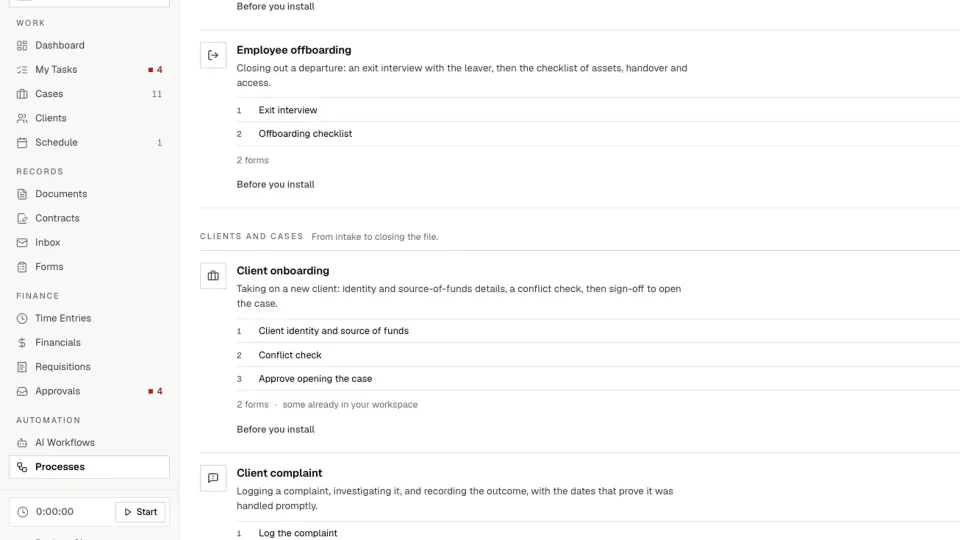
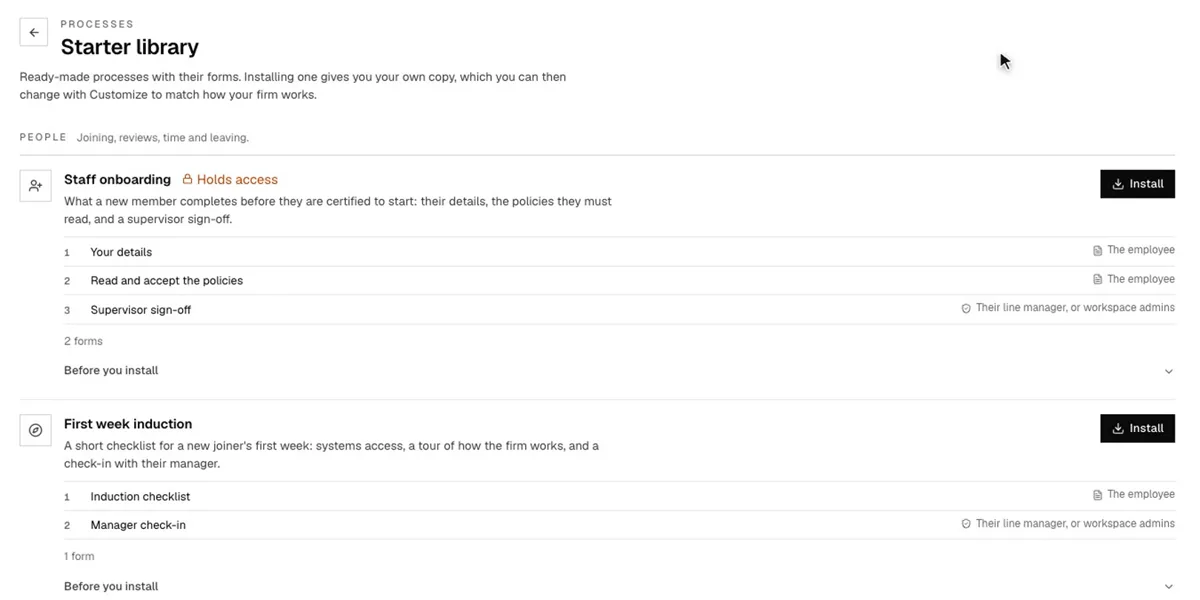
The starter library holds ready-made processes with their forms. Installing one gives you your own copy, which you can then change with Customize to match your policy.
Build
Two kinds of step, in the order you need.
A form step asks someone to fill something in. An approval step asks someone to review and sign off. Lay them out from top to bottom, then publish.
- Assign a step to whoever started it, a named person, a role or the subject’s manager
- Set a due date that sends reminders
- Send one step to many people and gather every response before moving on
- Run it anywhere, or attach it to a case
Run
One person, or the whole firm at once.
Start runs a process once. Launch to many runs it for a whole group, such as an appraisal for every team member. Each step lands in the right person’s My Tasks, and the process moves on when they finish.
- Runs shows each individual run
- Campaigns shows group launches, with completion figures
Self-service
Staff start what they need.
Administrators choose which processes staff can raise themselves. Staff then press New in My Tasks and pick one, such as a leave request or a training form, and can follow it under Waiting on others and Done.
FAQ
Questions, addressed.
How is a process different from an AI workflow?
A process waits for people: it pauses until someone fills a form or signs off. An AI workflow runs by itself and never waits on a person. AI workflows have their own page.
Do we have to build processes from scratch?
No. Install one from the starter library and customize what you need, or build your own with form and approval steps.
Can staff start a process themselves?
Yes, for the processes you open to self-service.
Can we run a process for everyone at once?
Yes. Launch to many runs it for a whole group, and Campaigns shows how far each batch has got. This is limited to workspace administrators.
Can a process belong to a case?
Yes. A process can run anywhere or attach to a case, and Processes also appears as a tab inside a case.
Which plans include processes?
Processes are available on all plans, and the module can be turned on or off per workspace.
Starter library
What a starter looks like.
A few examples from the library, with the steps they come with. Change any of them to suit your firm.
| Process | Steps |
|---|---|
| Staff onboarding | Your details, read and accept the policies, supervisor sign-off |
| First week induction | Induction checklist, manager check-in |
| Probation review | Probation self-assessment, supervisor review, confirmation decision |
| Employee offboarding | Exit interview, offboarding checklist |
| Client onboarding | Client identity and source of funds, conflict check, approve opening the case |
| Client complaint | Log the complaint, investigate, sign off the outcome |
The library also covers appraisals, timesheets, leave, training, case closure, client account reconciliation, annual compliance re-certification, and practising certificates and CPD.
Keep reading
Related reading.
See it on your firm’s routines.
Get started in minutes, or book a demo and we’ll set up your first process with you.