Getting Started with Case Management
ModulawAI’s case management system is built for legal professionals who need to move fast without sacrificing organization. Whether you’re a solo practitioner handling a dozen matters or part of a team managing hundreds, the case creation workflow is designed to be quick, intuitive, and comprehensive.
This guide walks you through creating your first case, understanding every field on the form, and organizing your matters so you can find anything in seconds.
Creating a New Case
From your Case Manager sidebar, click on Cases. At the top, you’ll see the “New Case” button. The case creation form opens with fields grouped into logical sections.
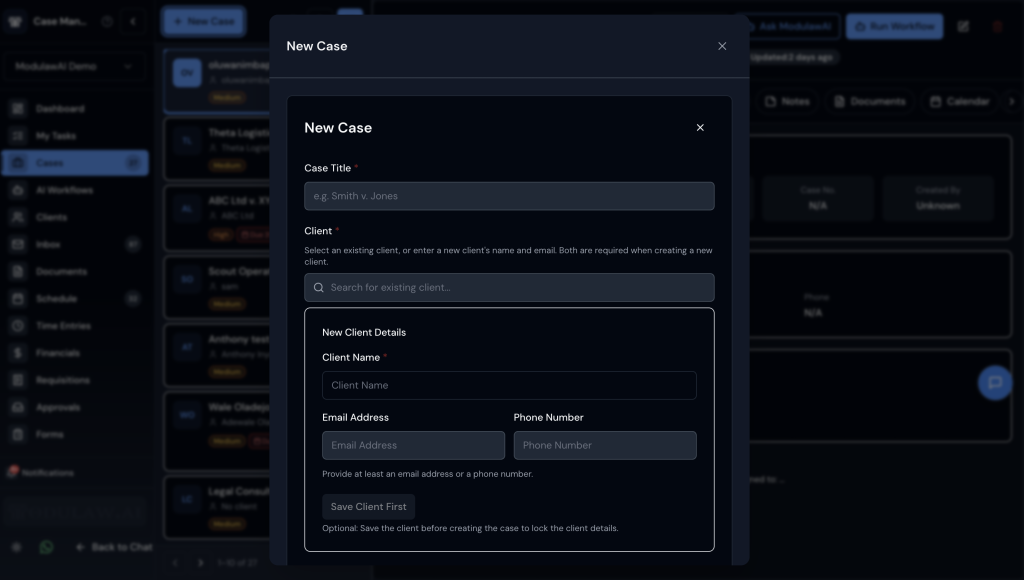
Here’s what each field means and why it matters:
Required Fields
- Case Title -The name of the matter. Use a consistent naming convention across your firm. Examples: “Okeke v Zenith Bank Plc” for litigation, or “Greenfield Acquisition- Due Diligence” for transactional work. This is what appears in search results and case lists, so make it descriptive.
- Client- You can select an existing client or create a new one with the client details.
Optional but Recommended Fields
- Filed at Court– To determine if it is a fresh matter or an existing one.
- Description– A free-text summary of the matter. Think of this as the “elevator pitch” for the case; anyone on your team should understand the matter from this paragraph.
- Team & Assignment- You can assign it to a team, for example, the “litigation” team, and further assign it to team members.
- Priority– High, Medium, or Low. Priority flags influence how cases sort in your dashboard and can trigger notification rules.
- Case Type– You can select the type of case, such as criminal, civil, property, etc.
- Due Date– When the matter should be duly handled. This works best for transactional matters with a deadline.
Case Numbering
ModulawAI supports two numbering approaches:
- Auto-Generated – The platform assigns a unique internal ID to every case. This is always available and never changes, making it a reliable reference even if court numbers shift.
- Custom Numbering – Your workspace can configure a numbering scheme (e.g., FNN/2026/LIT/001). This is configured in Workspace Settings and automatically applied to new cases.
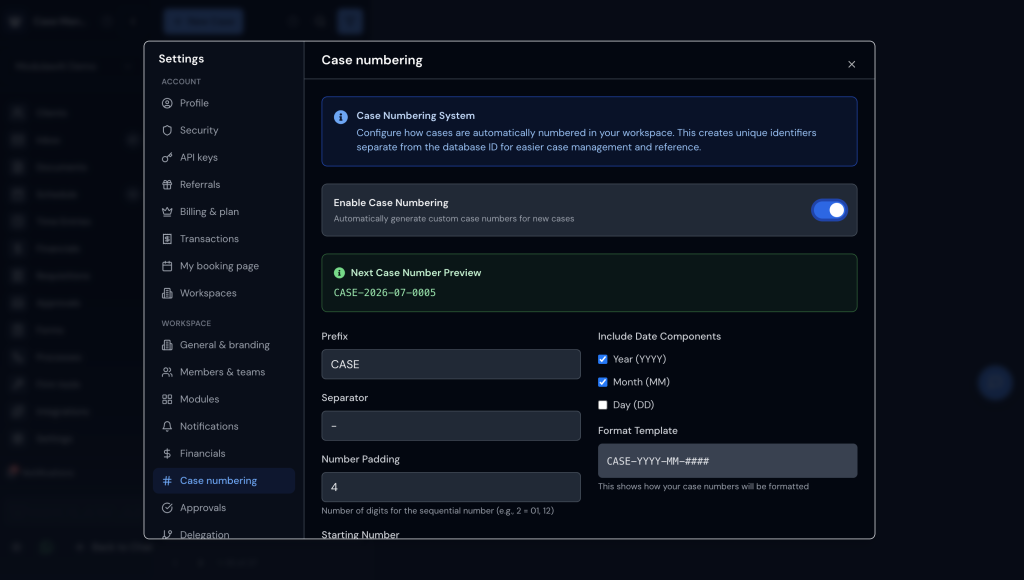
We recommend using both: let the platform auto-generate the internal ID for database integrity, and configure a human-readable custom scheme for day-to-day reference.
Organizing Your Cases
Once cases are created, organization is what keeps a growing practice manageable. ModulawAI gives you several layers of organization:
Practice Groups
Cases can be assigned to Practice Groups, sub-teams within your workspace. For example, a mid-sized firm might have “Litigation Team”, “Corporate Team”, and “Property Team” as practice groups. Each group sees its own filtered view by default, reducing noise.
Filters and Saved Views
The case list has a filter bar for narrowing down what you are looking at: by status, priority, assigned team member and client. Combine filters to get to the subset you want.
Saved views are available on the Clients list rather than the case list, so case filters are set fresh each time. Where you want a persistent slice of matters, a practice group is the durable way to get it.
Best Practices
- Adopt a naming convention early. Decide whether you use Plaintiff v Defendant, Client Name- Matter Type, or another format, and stick to it. Consistency makes searching effortless.
- Fill in the description immediately. Even two sentences while the facts are fresh saves your future self (and your colleagues) from having to reconstruct context.
- Put working context in the description. Cases do not carry free-form tags, so anything you would have tagged (“needs senior review”, “limitation period approaching”) belongs in the description or a case note, where search will still find it.
- Link the client record. Even if you’re in a hurry, linking the client takes seconds and unlocks billing, conflict-checking, and client-portal features down the line.
- Keep practice groups current. They are the durable way to slice your caseload, so as teams and matters shift, make sure cases are assigned to the right group.