The By case report shows, for any period, what each case has invoiced, what has been paid and what is still owed. It uses your firm’s own word for a case, so you may see By matter or By brief. In the classic layout the tab is called Revenue by case.
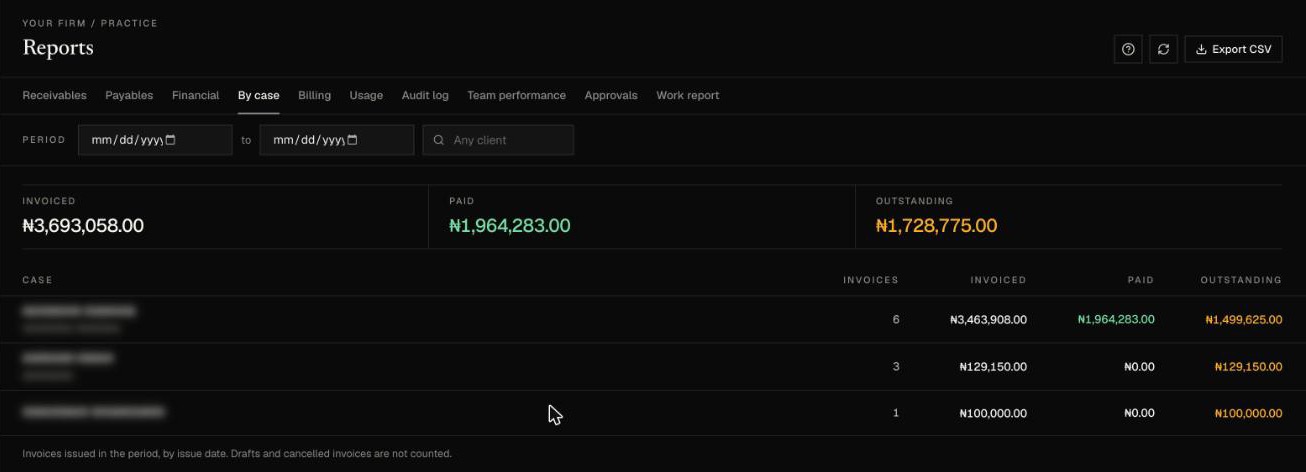
ModulawAI works this out from your invoices and the payments recorded against them. The money itself stays in your own accounts.
Who can see it
You need the Financial reports permission. Owners have it. To limit the report to certain people, such as your managing partner and your accountant, give it to them alone under Account and settings, Workspaces: open your workspace and choose Permissions. Everyone else cannot open the tab or download its CSV.
If a matter is walled off, people outside the wall do not see it in this report, and its figures are left out of their totals.
Open the report
- Go to Reports and choose the By case tab.
- Choose the Period: a start date and an end date. Leave both empty to see every invoice.
- To look at one client, search for them in Any client.
What the figures mean
| Figure | What it shows |
|---|---|
| Invoices | How many invoices for this case were issued in the period. |
| Invoiced | The total of those invoices. |
| Paid | What has been paid against those invoices so far. Anything credited shows underneath, such as withholding tax or a discount given by credit note. |
| Outstanding | What is still owed: invoiced, less paid, less credited. |
The figures at the top add up every case. If you bill in more than one currency, each currency has its own totals and each case has a row per currency. Amounts are never converted or added across currencies.
What is counted
- Invoices count in the period of their issue date.
- Drafts and cancelled invoices are left out, because they are not revenue.
- Invoices not linked to a case appear together on one row, Firm invoices (no case).
This report follows your invoices, not the date cash arrived. If an October invoice is paid in November, that payment shows against October. To see money by the date you received it, use your bank statements.
Make a monthly summary
- Set the Period to the first and last day of the month.
- Choose Export CSV.
- Open the file in Excel, Numbers or Google Sheets. Each line is one case in one currency, with its case number, title, client, invoice count, and the invoiced, paid, credited and outstanding amounts.
The CSV covers the period and client you chose on screen, and the file name includes the period.
If a figure looks wrong
- A case is missing: check that its invoice has been sent, not left as a draft, and that the issue date falls in the period.
- Paid looks too low: record any bank transfer, cash or cheque against the invoice. See Recording payments, part payments and credit notes.
- Outstanding includes withholding tax: add the tax as a credit note so the invoice closes in full.